> ## Documentation Index
> Fetch the complete documentation index at: https://mainwp-docs-review-bulk-settings-manager-extension.mintlify.site/llms.txt
> Use this file to discover all available pages before exploring further.
# Custom Dashboard
> Customize the layout, appearance, and functionality of your MainWP Dashboard with this Extension to create an interface that suits your needs.
## What You'll Learn
* Adding custom PHP, CSS, and JavaScript to your Dashboard
* Where custom code is stored and executed
* Handling PHP errors safely
* Accessing example code snippets
***
**Extension Add-on** - This add-on provides standalone functionality within MainWP Dashboard. No third-party plugins required.
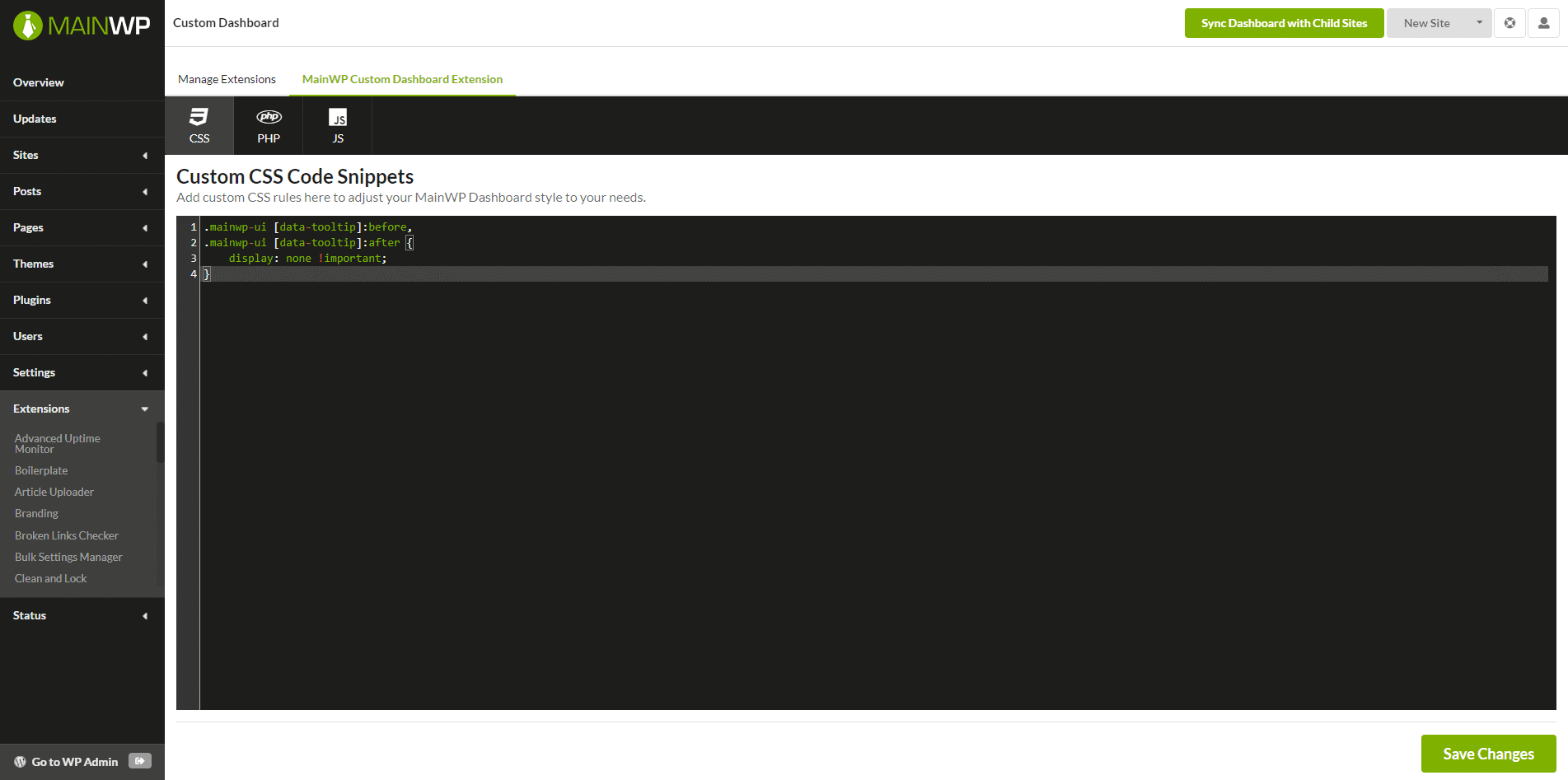
The MainWP Custom Dashboard Extension is designed to contain your custom snippets for your MainWP Dashboard.
By adding custom snippets to this plugin, you can easily extend your MainWP Dashboard functionality or change the way it looks.
This extension will help you to keep all your changes in one location and independent of the other components.
This enables you to safely update your MainWP Dashboard plugin on your MainWP Dashboard site without worry about losing your modifications as well as deactivating your custom code if needed for troubleshooting.
The built-in code editor allows you to add your code directly through the extension interface.
**No FTP access is required.**
Check out our Github repository where we keep example snippets that will help you get started:
* [CSS Code Snippets](https://github.com/mainwp/mainwp-custom-dashboard-extension-examples/tree/master/css)
* [PHP Code Snippets](https://github.com/mainwp/mainwp-custom-dashboard-extension-examples/tree/master/php)
* [JS Code Snippets](https://github.com/mainwp/mainwp-custom-dashboard-extension-examples/tree/master/js)
## How It Works
MainWP Custom Dashboard Extension saves your custom code to your MainWP Dashboard database instead of containing code in PHP/CSS/JS file.
For CSS and JS snippets, the extension will print saved code in the element on your MainWP Dashboard site.
Saved PHP Code Snippets will be executed by using the PHP function `eval()`.
In case the `eval()` function is disabled on your host, please contact your host support and have them enable it for you.
In case you try to save PHP code with syntax error and cause PHP Fatal Error, the extension uses the wp\_php\_error\_message filter provided by WordPress to prevent your MainWP Dashboard site from crashing.
After saving bad code, you will see the error message and link to go back to fix the code:
MainWP Custom Dashboard Extension is used to apply custom code snippets to the MainWP Dashboard site ONLY!
It doesn't apply code to child sites.
To apply custom code snippets to child sites, please see the [MainWP Code Snippets Extension](https://mainwp.com/extension/code-snippets/).
***
## Related Resources
* [Development Add-ons](/add-ons/development) - Browse all development tools
* [Code Snippets Extension](/add-ons/development/code-snippets-extension) - Deploy code to child sites
* [Dashboard Themes](/customization/how-to-change-the-theme-for-mainwp) - MainWP Dashboard appearance and theme behavior
 This extension will help you to keep all your changes in one location and independent of the other components.
This enables you to safely update your MainWP Dashboard plugin on your MainWP Dashboard site without worry about losing your modifications as well as deactivating your custom code if needed for troubleshooting.
The built-in code editor allows you to add your code directly through the extension interface.
**No FTP access is required.**
Check out our Github repository where we keep example snippets that will help you get started:
* [CSS Code Snippets](https://github.com/mainwp/mainwp-custom-dashboard-extension-examples/tree/master/css)
* [PHP Code Snippets](https://github.com/mainwp/mainwp-custom-dashboard-extension-examples/tree/master/php)
* [JS Code Snippets](https://github.com/mainwp/mainwp-custom-dashboard-extension-examples/tree/master/js)
## How It Works
MainWP Custom Dashboard Extension saves your custom code to your MainWP Dashboard database instead of containing code in PHP/CSS/JS file.
For CSS and JS snippets, the extension will print saved code in the element on your MainWP Dashboard site.
Saved PHP Code Snippets will be executed by using the PHP function `eval()`.
In case the `eval()` function is disabled on your host, please contact your host support and have them enable it for you.
In case you try to save PHP code with syntax error and cause PHP Fatal Error, the extension uses the wp\_php\_error\_message filter provided by WordPress to prevent your MainWP Dashboard site from crashing.
After saving bad code, you will see the error message and link to go back to fix the code:
This extension will help you to keep all your changes in one location and independent of the other components.
This enables you to safely update your MainWP Dashboard plugin on your MainWP Dashboard site without worry about losing your modifications as well as deactivating your custom code if needed for troubleshooting.
The built-in code editor allows you to add your code directly through the extension interface.
**No FTP access is required.**
Check out our Github repository where we keep example snippets that will help you get started:
* [CSS Code Snippets](https://github.com/mainwp/mainwp-custom-dashboard-extension-examples/tree/master/css)
* [PHP Code Snippets](https://github.com/mainwp/mainwp-custom-dashboard-extension-examples/tree/master/php)
* [JS Code Snippets](https://github.com/mainwp/mainwp-custom-dashboard-extension-examples/tree/master/js)
## How It Works
MainWP Custom Dashboard Extension saves your custom code to your MainWP Dashboard database instead of containing code in PHP/CSS/JS file.
For CSS and JS snippets, the extension will print saved code in the element on your MainWP Dashboard site.
Saved PHP Code Snippets will be executed by using the PHP function `eval()`.
In case the `eval()` function is disabled on your host, please contact your host support and have them enable it for you.
In case you try to save PHP code with syntax error and cause PHP Fatal Error, the extension uses the wp\_php\_error\_message filter provided by WordPress to prevent your MainWP Dashboard site from crashing.
After saving bad code, you will see the error message and link to go back to fix the code:
 MainWP Custom Dashboard Extension is used to apply custom code snippets to the MainWP Dashboard site ONLY!
It doesn't apply code to child sites.
To apply custom code snippets to child sites, please see the [MainWP Code Snippets Extension](https://mainwp.com/extension/code-snippets/).
***
## Related Resources
* [Development Add-ons](/add-ons/development) - Browse all development tools
* [Code Snippets Extension](/add-ons/development/code-snippets-extension) - Deploy code to child sites
* [Dashboard Themes](/customization/how-to-change-the-theme-for-mainwp) - MainWP Dashboard appearance and theme behavior
MainWP Custom Dashboard Extension is used to apply custom code snippets to the MainWP Dashboard site ONLY!
It doesn't apply code to child sites.
To apply custom code snippets to child sites, please see the [MainWP Code Snippets Extension](https://mainwp.com/extension/code-snippets/).
***
## Related Resources
* [Development Add-ons](/add-ons/development) - Browse all development tools
* [Code Snippets Extension](/add-ons/development/code-snippets-extension) - Deploy code to child sites
* [Dashboard Themes](/customization/how-to-change-the-theme-for-mainwp) - MainWP Dashboard appearance and theme behavior